Diff and merge
Compare two documents and take changes from one into the other.
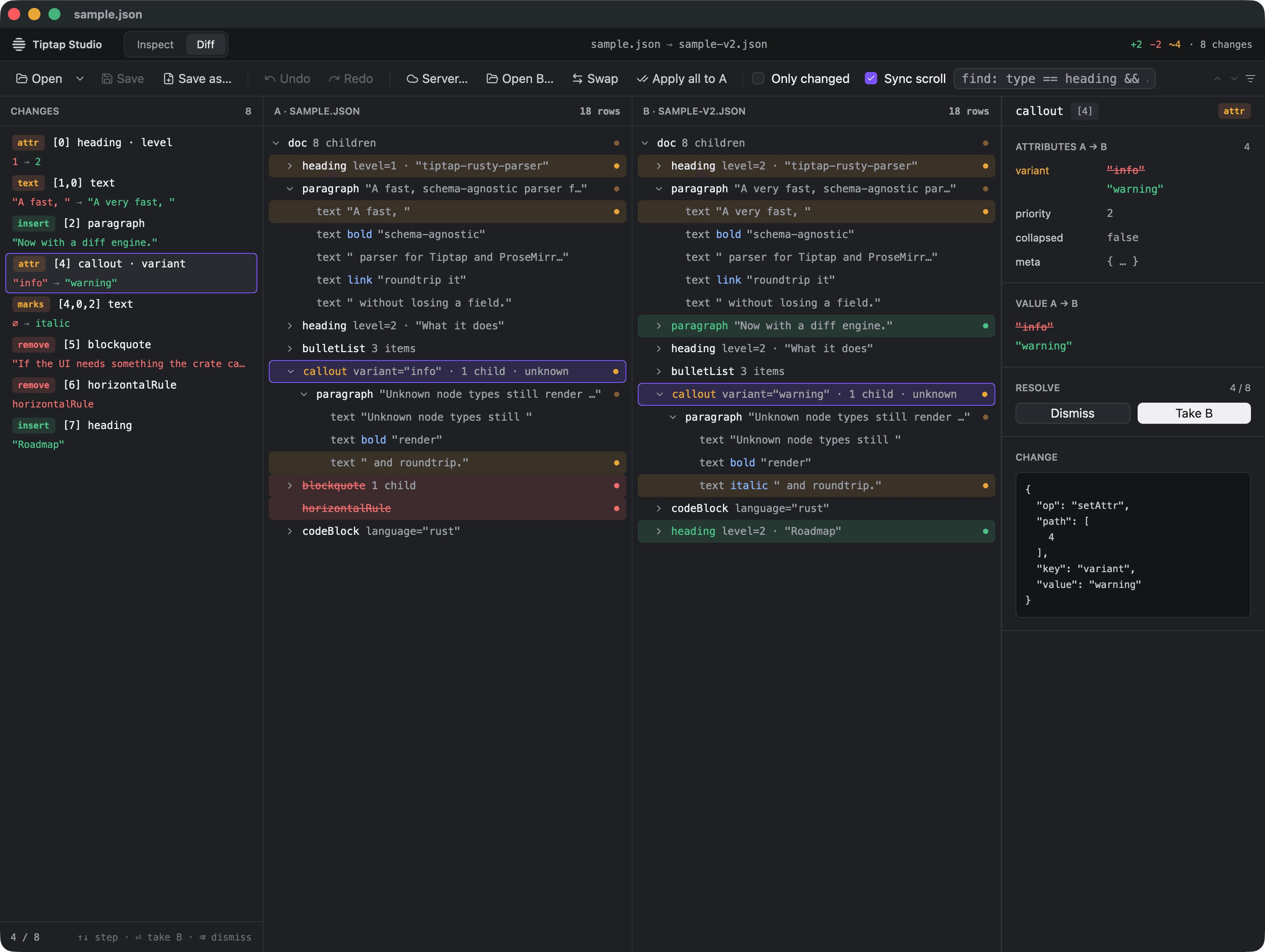
Diff mode compares document A with a second document, B, lists every change from A to B, and lets you apply them to A one by one or all at once. B is never modified; you build the result in A and save it.
Open B
Switch to Diff in the title bar, then click Open B… in the toolbar. You can also:
- pass B on the command line:
tiptap-studio a.json b.json; - drop a file on the window in Diff mode. Before a B is loaded the whole window takes it as B. Once one is, dropping on tree A opens the file as A and anywhere else replaces B;
- open a version from a Document Server as B, or pick two versions with Diff versions… to open them as a pair.
Read the changes
Diff mode has four panes: the change list, tree A, tree B and a before/after inspector. Both trees are tinted by change kind, and the title bar counts additions, removals and edits.
The change list is in document order. Select a change with the mouse or ↑ / ↓ and the inspector shows it: the value or the attributes before and after, and the change itself as JSON.
- Only changed hides the unchanged rows in both trees and expands the path to every change.
- Sync scroll scrolls the other tree along so the same node stays at the same height.
Resolve changes
For the selected change:
| Action | Key | What it does |
|---|---|---|
| Take B | ⏎ | Applies the change to A. |
| Dismiss | ⌫ | Keeps A as it is. The change leaves the list and the counts, and Apply all skips it. |
| Restore | ⌫ | On a dismissed change, brings it back. |
When you have dismissed changes, the change list shows a toggle, for example
2 dismissed · show, that lists them again so you can restore one.
Select a node in tree A or B instead of a change, and the inspector offers Take all B in subtree, which applies every open change under that node at once.
Apply all to A in the toolbar applies every change you have not dismissed.
Each of these is a single undo step, so ⌘Z (Ctrl+Z) reverts a Take B, a subtree or an Apply all as a whole. The change list recomputes after every edit.
Swap A and B
Swap makes B the editable A and A the read-only B. It resets the undo history and your dismissals, since they described the old pair. If A has unsaved edits, it asks first: Save, Swap anyway or Cancel.
Save the result
Save writes A over its file. With a B loaded, Save as… suggests
<name>-merged.json next to A, so a merge does not overwrite the original by accident.